Training API
deepspeed.initialize() returns a training engine in its first argument
of type DeepSpeedEngine. This engine is used to progress training:
for step, batch in enumerate(data_loader):
    #forward() method
    loss = model_engine(batch)

    #runs backpropagation
    model_engine.backward(loss)

    #weight update
    model_engine.step()
Note that model_engine.backward() accepts only a scalar loss tensor produced by a forward pass.
Starting from v0.18.3, DeepSpeed also supports direct calls to tensor.backward(). You can now call
loss.backward() or tensor.backward(out_grad) when your PyTorch version supports the necessary APIs.
If your PyTorch version does not support these APIs, a direct call to tensor.backward() will raise an error.
Forward Propagation
Backward Propagation
Loss Scaling for Manual Backward Passes
When using mixed precision training (fp16, bf16, or torch.autocast), DeepSpeed applies loss scaling
to prevent gradient underflow. If you prefer to call loss.backward() directly instead of
engine.backward(loss), you must use engine.scale(loss) to apply the appropriate loss scaler:
# Option 1: Use engine.backward() (recommended)
loss = model_engine(batch)
model_engine.backward(loss)

# Option 2: Manual backward with scaling
loss = model_engine(batch)
scaled_loss = model_engine.scale(loss)
scaled_loss.backward()
Both approaches produce identical gradients. The scale() method automatically applies the
appropriate scaler based on your configuration (ZeRO optimizer scaler, torch.autocast GradScaler, etc.).
Optimizer Step
Gradient Accumulation
DeepSpeed accumulates gradients over gradient_accumulation_steps micro-batches
before averaging them and applying an optimizer step. The managed_gradient_accumulation
config flag (default true) controls who decides when that accumulation boundary occurs.
Managed Gradient Accumulation (default)
With "managed_gradient_accumulation": true (the default), DeepSpeed tracks an
internal micro-step counter and treats every gradient_accumulation_steps-th
micro-batch as the accumulation boundary
((micro_steps + 1) % gradient_accumulation_steps == 0). Only on that boundary does
step() reduce gradients and apply the optimizer update, so you can call
forward/backward/step symmetrically on every micro-batch:
for step, batch in enumerate(data_loader):
    loss = model_engine(batch)
    model_engine.backward(loss)
    model_engine.step()   # optimizer runs only on the accumulation boundary
Unmanaged Gradient Accumulation
With "managed_gradient_accumulation": false, micro-step tracking is disabled and the
caller owns the accumulation boundary. backward() only accumulates gradients, and each
step() finalizes the accumulated gradients and applies exactly one optimizer update. You
are responsible for calling step() when accumulation is complete:
# ds_config = {..., "managed_gradient_accumulation": False}
for step_batches in batched_micro_batches:            # caller decides the boundary
    num_micro_batches = len(step_batches)             # may differ from gradient_accumulation_steps
    for micro_batch in step_batches:
        loss = model_engine(micro_batch)
        # scale_wrt_gas=False disables DeepSpeed's 1/gradient_accumulation_steps scaling,
        # so average over the actual micro-batch count yourself.
        averaged_loss = loss / num_micro_batches
        model_engine.backward(averaged_loss, scale_wrt_gas=False)   # accumulate only
    model_engine.step()                               # reduce + optimizer update
This is useful when backward and step must be decoupled and the number of
backward() calls per optimizer step is decided by the caller at run time – for example
client- or RPC-driven RL backends where a single optimizer step arrives as N backward()
calls followed by one step(), with N unknown at configuration time.
Unmanaged mode currently supports ZeRO stage 0/1/2/3 and DDP, including ZeRO optimizer-state
and parameter offload (CPU/NVMe). For ZeRO stage 0/1 (and DDP), backward() accumulates gradients
locally and step() performs the gradient all-reduce followed by the optimizer update. For ZeRO
stage 2/3, gradients are reduced/partitioned on every backward() (as in managed mode) and
step() finalizes the accumulated partition gradients (including deferred offload norm/FP32 or
NVMe copy when offload is enabled) before the optimizer update; ZeRO overlap_comm is supported
in the stage-2 path.
Note
By default backward() scales the loss and gradients by the configured
gradient_accumulation_steps. In unmanaged mode the number of backward() calls per step is
owned by the caller and may differ from that value (and may vary per step), so the default scaling
would be incorrect. Pass scale_wrt_gas=False to disable DeepSpeed’s scaling and average the
loss yourself over the actual micro-batch count, as shown above. (If you intentionally call
backward() exactly gradient_accumulation_steps times per step, the default scaling still
applies and no manual averaging is needed.)
Note
Unmanaged mode supports ZeRO stage 0/1/2/3 (and DDP), including ZeRO optimizer-state and parameter
offload (CPU/NVMe). It is incompatible with pipeline parallelism, DeepCompile, and Apex AMP, which
are rejected at initialization. ZeRO overlap_comm is supported only with ZeRO stage 2
(rejected for stage 0/1, where reduction is deferred to step()).
Coalesced Gradient Reduction
Use this when one optimizer step needs multiple engine.backward() calls
and per-backward reduction is wasted work. Typical cases are GradCache-style
cached contrastive losses that replay backward over chunked representations,
and custom torch.autograd.Function subclasses that call
torch.autograd.backward from inside their forward. Results are
bit-exact against the per-backward baseline.
Under ZeRO-3, each backward inside the block leaves param-shaped gradients
on the leaf modules instead of triggering the per-backward reduce-scatter.
On exit, a single pass drives the reducer over the accumulated grads and
restores the partitioned averaged_gradients for step().
for batch in data_loader:
    chunks = batch.split(chunk_size)
    with model_engine.coalesce_grad_reduction():
        for chunk in chunks:
            loss = model_engine(chunk)
            model_engine.backward(loss)
    model_engine.step()
Communication
With N back-to-back backward() calls per step, ZeRO-2 and ZeRO-3
normally issue N gradient collectives (one per backward). Inside
coalesce_grad_reduction() those collapse to one collective on exit.
ZeRO-1 already reduces only at the accumulation boundary, so its collective
count is unchanged; the context still removes the per-backward bucket setup
cost.
Memory
Suppressing the per-backward reduction means each rank holds a full local
gradient copy for the duration of the with block.
ZeRO-2: window-resident memory equals ZeRO-1 with
deepspeed.DeepSpeedEngine.no_sync(), one full gradient per rank held until flush. On a 2-GPU, 134M-param bf16 rig withN=4, peak window memory drops from 640 MiB (baseline) to 384 MiB.ZeRO-3: window-resident is one full gradient per rank vs the
1/world_sizepartition the per-backward path holds throughout. Peak is roughly equal to baseline (the in-flight backward already needs full-grad room and the accumulator reuses it).
Constraints
ZeRO stage 0 and pipeline parallelism raise
NotImplementedError.The BF16/FP16 optimizer wrappers (
BF16_Optimizer,FP16_Optimizer) route grads through their ownbackward_epiloguepath and are not yet supported; the context raisesNotImplementedErrorat entry. Use raw ZeRO-1/2/3 for now.engine.step()inside thewithblock raises.Cannot be nested inside
deepspeed.DeepSpeedEngine.no_sync().Do not split one
gradient_accumulation_stepswindow across multiplewithblocks: the flush overwritesaveraged_gradientson each exit.
deepspeed.DeepSpeedEngine.no_sync() raises AssertionError for
ZeRO-2 and ZeRO-3 (zero_optimization_partition_gradients() is true for
stage >= 2), so it cannot collapse collectives for those stages.
coalesce_grad_reduction() is the equivalent for ZeRO-2/3.
Mixed Precision Training
DeepSpeed supports mixed precision training using either native or PyTorch mechanisms. The desired mixed precision mode can be selected through the configuration dict. Mixed precision training can used with ZeRO (i.e., stages > 0) and without ZeRO (i.e., stage=0).
Native Mixed Precision
DeepSpeed provides native support for fp16 and bf16 mixed precsion training.
PyTorch Automatic Mixed Precision (AMP)
DeepSpeed provides torch-compatible automatic mixed precision (AMP) training via torch.autocast functionality. The following snippet illustrates how to enable Torch AMP.
{
    "torch_autocast": {
        "enabled": true,
        "dtype": "bfloat16",
        "lower_precision_safe_modules": ["torch.nn.Linear", "torch.nn.Conv2d"]
    },
    ...
}
Each configuration works as follows:
enabled: Enabletorch.autocastwhen set toTrue. You don’t need to calltorch.autocastin your code. The grad scaler is also applied in the DeepSpeed optimizer.dtype: Lower precision dtype passed totorch.autocast. Gradients for all-reduce (reduce-scatter) and parameters for all-gather (only for ZeRO3) oflower_precision_safe_modulesare also downcasted to thisdtype.lower_precision_safe_modules: The list of modules that will be downcasted for all-reduce (reduce-scatter) and all-gather (ZeRO3). The precision for PyTorch operators in forward/backward followstorch.autocast’s policy, not this list. If you don’t set this item, DeepSpeed uses the default list:[torch.nn.Linear, torch.nn.Conv1d, torch.nn.Conv2d, torch.nn.Conv3d].
Manual Backward with torch.autocast
When using torch.autocast with manual backward passes (loss.backward() instead of engine.backward()),
you must use engine.scale(loss) to apply the gradient scaler:
# Training loop with torch.autocast and manual backward
for batch in data_loader:
    loss = model_engine(batch)

    # Apply loss scaling before manual backward
    scaled_loss = model_engine.scale(loss)
    scaled_loss.backward()

    model_engine.step()
The scale() method ensures that the torch.amp.GradScaler is properly applied when torch.autocast
is enabled with fp16. For bf16 or when no mixed precision is used, scale() returns the loss unchanged.
If you call loss.backward() directly without using engine.scale() or engine.backward(), DeepSpeed
will raise a RuntimeError to prevent training with unscaled gradients, which can lead to incorrect results
or gradient underflow.
Using torch.autocast Outside the Engine
DeepSpeed applies torch.autocast internally during engine.forward().
However, you may also want autocast to cover code that runs outside the engine,
such as a loss function or post-processing logic. In that case, wrap the entire
forward-plus-loss block in your own torch.autocast context:
# Autocast covers both the engine forward AND the loss computation
with torch.autocast(device_type="cuda", dtype=torch.bfloat16):
    logits = model_engine(input_ids)
    loss = loss_fn(logits.view(-1, vocab_size), labels.view(-1))
Without the outer torch.autocast, only the model’s forward pass benefits from
autocast; the loss function would run in full precision.
When DeepSpeed detects a nested autocast context, it handles it as follows:
If
torch_autocastis enabled in the DeepSpeed config, the engine overrides the outer context with the dtype from the config. An info message is logged once.If
torch_autocastis disabled in the config (i.e., you are using DeepSpeed’s built-in bf16/fp16 support instead), the engine disables autocast insideengine.forward()and a warning is logged once.
In both cases, PyTorch’s torch.autocast is idempotent when nested with the same
dtype, so there is no performance or correctness penalty from the nesting.
Configuring ZeRO Leaf Modules
ZeRO-3 relies on module execution order to gather partitioned parameters. When models select submodules dynamically (for example, MoE routers), different data-parallel ranks may gather different sets of parameters, which can cause the all-gather collective to deadlock. To avoid this problem, you can designate the parent of dynamically activated submodules (e.g., MoE experts) as a “leaf” module. When a module is marked as a leaf, ZeRO gathers all of its descendants immediately and stops inserting hooks beneath it.
Programmatic API
Use deepspeed.utils.set_z3_leaf_modules() to flag modules by class, class
name, or both. Optionally combine with
deepspeed.utils.set_z3_leaf_modules_by_name() to target specific entries
from model.named_modules() or
deepspeed.utils.set_z3_leaf_modules_by_suffix() to match suffixes of those
names.
from deepspeed.utils import (
    set_z3_leaf_modules,
    set_z3_leaf_modules_by_name,
    set_z3_leaf_modules_by_suffix,
)

# Match by class or subclass
set_z3_leaf_modules(model, [CustomMoEBlock])

# Match by fully qualified class name
set_z3_leaf_modules(model, ["my_package.layers.CustomMoEBlock"])

# Match by module name returned from model.named_modules()
set_z3_leaf_modules_by_name(model, ["transformer.layers.0.experts"])

# Match by suffix of names returned from model.named_modules()
set_z3_leaf_modules_by_suffix(model, ["experts"])
Configuration in DeepSpeed config
The same behavior can be controlled from the DeepSpeed config. Add a
leaf_module block to zero_optimization specifying either classes,
module names, or name suffixes (or any combination). While the example below shows three different ways (classes, names, and name_suffixes) to specify modules as leaf modules, typically you will use just one of these.
{
  "train_micro_batch_size_per_gpu": 1,
  "zero_optimization": {
    "stage": 3,
    "leaf_module": {
      "classes": ["my_package.layers.CustomMoEBlock"],
      "names": ["transformer.layers.0.experts"],
      "name_suffixes": ["experts"]
    }
  }
}
names must match exactly what model.named_modules() produces. The
name_suffixes field compares each suffix against the end of those same
module paths, making it convenient to apply a rule across repeated structures.
Entries in classes may be either bare class names (for example,
MixtralSparseMoeBlock) or fully qualified dotted paths; both forms are
accepted.
You can mix and match the API and configuration approaches; all referenced modules are flagged before ZeRO installs its hooks.
By default DeepSpeed marks several Hugging Face MoE blocks—including Mixtral and Qwen MoE sparse blocks so that they behave well with ZeRO3. The default class list currently contains:
transformers.models.mixtral.modeling_mixtral.MixtralSparseMoeBlocktransformers.models.qwen2_moe.modeling_qwen2_moe.Qwen2MoeSparseMoeBlocktransformers.models.qwen3_moe.modeling_qwen3_moe.Qwen3MoeSparseMoeBlock
Model Saving
Additionally when a DeepSpeed checkpoint is created, a script zero_to_fp32.py is added there which can be used to reconstruct fp32 master weights into a single pytorch state_dict file.
Training Multiple Models
DeepSpeed supports training multiple models, which is a useful feature in scenarios such as knowledge distillation and post-training RLHF. The core approach is to create individual DeepSpeedEngines for each model.
Training Independent Models
The following code snippet illustrates independently training multiple models on the same dataset.
model_engines = [engine for engine, _, _, _ in [deepspeed.initialize(m, ...,) for m in models]]
for batch in data_loader:
   losses = [engine(batch) for engine in model_engines]
   for engine, loss in zip(model_engines, losses):
      engine.backward(loss)
The above is similar to typical DeepSpeed usage except for the creation of multiple DeepSpeedEngines (one for each model).
Automatic Tensor Parallel Training
DeepSpeed supports Automatic Tensor Parallel (AutoTP) training for sharding
model weights across GPUs while remaining compatible with ZeRO and standard
training workflows. This training API is different from the inference-only
tensor parallel API exposed by deepspeed.init_inference.
Tensor parallelism (TP) splits the computations and parameters of large layers across multiple GPUs so each rank holds only a shard of the weight matrix. This is an efficient way to train large-scale transformer models by reducing per-GPU memory pressure while keeping the layer math distributed across the TP group.
AutoTP training is enabled by setting tensor_parallel in the DeepSpeed
config and passing it to deepspeed.initialize. DeepSpeed applies AutoTP
sharding during engine initialization; calling deepspeed.tp_model_init, which we previously used to initialize AutoTP, is now optional.
See Initialization behavior for more details.
import deepspeed

ds_config = {
    "train_micro_batch_size_per_gpu": 1,
    "zero_optimization": {"stage": 2},
    "tensor_parallel": {"autotp_size": 4},
}

engine, optimizer, _, _ = deepspeed.initialize(
    model=model,
    optimizer=optimizer,
    config=ds_config,
    mpu=mpu,  # optional: TP/DP process groups
)
Note
AutoTP training supports ZeRO stages 0, 1, 2, and 3. With ZeRO Stage 3, checkpoint save/load and universal checkpoint conversion gather weights across both the ZeRO data-parallel and the tensor-parallel dimensions, so saved/converted checkpoints are complete.
Initialization behavior
AutoTP previously required calling set_autotp_mode(training=True) and deepspeed.tp_model_init before deepspeed.initialize. Now we can include all the necessary configurations in the DeepSpeed config.
We still support the traditional initialization path for backward compatibility.
When you use both (i.e. calling set_autotp_mode(training=True) and deepspeed.tp_model_init and passing the config to deepspeed.initialize), we will merge the settings at initialization. When we have conflicting settings, we will error out.
Parameter partitioning
TP sharding needs to know which parameter tensors should be partitioned and along which dimensions. AutoTP provides three ways to balance ready-to-use defaults with customizability:
Heuristics: automatic sharding based on parameter names and model rules.
Preset: choose a built-in model family via
preset_model.Custom specs: define regex patterns and partition rules via
partition_config.HuggingFace tp_plan: automatically detected from
model.config.base_model_tp_planormodel._tp_plan.
HuggingFace tp_plan
Many HuggingFace models (e.g. Llama, Qwen, Gemma2) define a
base_model_tp_plan in their model config. When present, DeepSpeed
automatically extracts and converts this plan into internal partition rules.
This means you do not need preset_model or partition_config for these
models – just set autotp_size.
The resolution priority is:
partition_config(user-defined custom specs – highest priority)HuggingFace
tp_plan(from model config)AutoTP heuristics /
preset_model(lowest priority)
Currently colwise, rowwise, and gathered column styles
(colwise_gather_output / colwise_rep) from the HuggingFace tp_plan
are supported. Gathered column output layers may have output dimensions that are
not divisible by autotp_size; DeepSpeed uses uneven local shards and gathers
back to the original logical output size. Other types (local_colwise,
local_rowwise, local_packed_rowwise, gather,
sequence_parallel) are not yet handled and will raise an error.
Heuristic rules
Heuristics use parameter names and model-specific rules to decide how to shard
layers. If you are training a supported model (see
Supported models), the heuristic rules automatically shard the
model, so you only need to add autotp_size.
{
  ...
  "tensor_parallel": {
    "autotp_size": 4
  },
  "zero_optimization": {
    ...
  },
  ...
}
Preset-based partitioning
You can explicitly specify the model family with preset_model:
{
  "tensor_parallel": {
    "autotp_size": 4,
    "preset_model": "llama"
  }
}
See Supported models for the supported preset names and the implementation in AutoTPPresets. If you add a new model family, you can easily add a new preset by defining patterns like the existing presets, and we welcome PRs for those additions.
Custom layer specs
If you are training a custom model, you can use partition_config to specify
custom regex-based patterns and partition settings.
{
  "tensor_parallel": {
    "autotp_size": 4,
    "partition_config": {
      "use_default_specs": false,
      "layer_specs": [
        {
          "patterns": [".*\\.o_proj\\.weight$", ".*\\.down_proj\\.weight$"],
          "partition_type": "row"
        },
        {
          "patterns": [".*\\.[qkv]_proj\\.weight$"],
          "partition_type": "column"
        },
        {
          "patterns": [".*\\.gate_up_proj\\.weight$"],
          "partition_type": "column",
          "shape": [2, -1],
          "partition_dim": 0
        }
      ]
    }
  }
}
You can also set use_default_specs to true to merge your custom
patterns on top of the preset (when preset_model is provided).
For fused or packed weights (for example QKV or gate/up projections), the
shape and partition_dim options control sub-parameter partitioning.
Sub-parameter partitioning lets AutoTP split a single weight tensor into
logical chunks before applying tensor-parallel sharding. For example, the
gate_up_proj weight can be viewed as two packed matrices (gate and up) by
setting shape to [2, -1] and partition_dim to 0; AutoTP then
partitions each chunk consistently across tensor-parallel ranks.
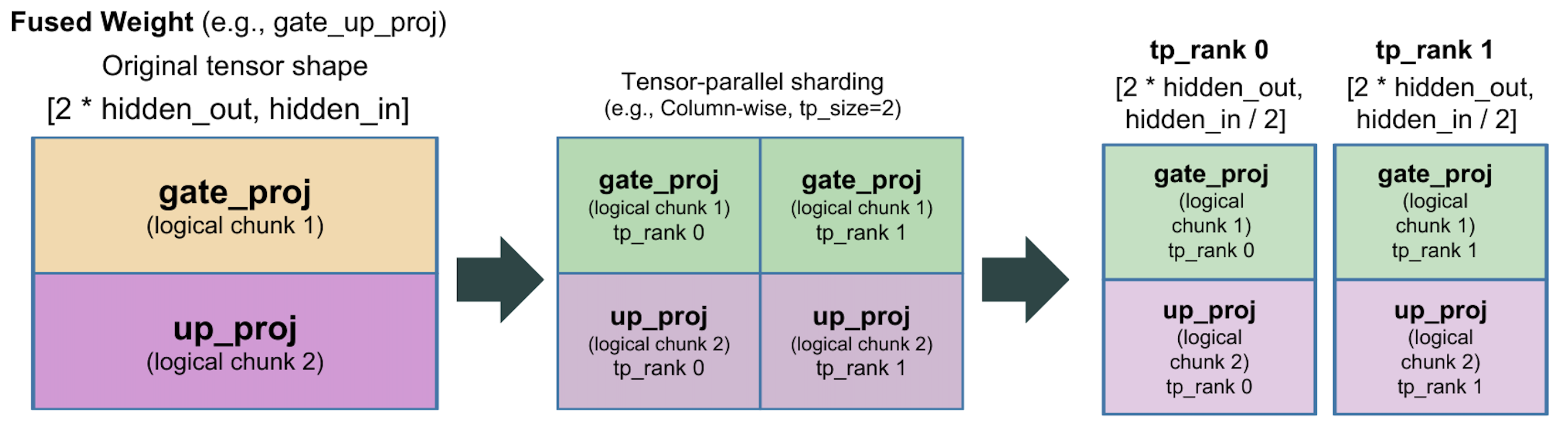
Another example is GQA-style fused QKV weights. The tensor can contain unequal
Q/K/V segments stacked along the output dimension. For example, set shape
to the explicit sizes (for example [(q_size, kv_size, kv_size), -1]) and
partition_dim to 0 so AutoTP splits the Q, K, and V regions first, then
shards each region across tensor-parallel ranks.
{
  "patterns": [".*\\.qkv_proj\\.weight$"],
  "partition_type": "column",
  "shape": [[q_size, kv_size, kv_size], -1],
  "partition_dim": 0
}

Supported models
The following model families are supported by built-in AutoTP presets:
llamabloomchatglmmixtraldeepseek_v2qwen2phi3
Preset definitions live in AutoTPPresets. If you add a new model family, you can easily add a new preset by defining patterns like the existing presets, and we welcome PRs for those additions.
These strings are the values accepted by preset_model and are matched
against the model type in model.config.model_type (case-insensitive). When
preset_model is not set, AutoTP uses the legacy automatic sharding rules
unless you provide a custom partition_config.
These presets are also useful when you want to extend the default patterns:
set use_default_specs to true in partition_config to merge your custom
specs on top of the selected preset.
Automatic Sequence Parallel Training
DeepSpeed supports Automatic Sequence Parallel (AutoSP) training for enabling compiler-based sequence parallelism to unlock long-context LLM training. AutoSP leverages defines custom passes to automatically shard inputs along the sequence dimension and enable Ulysses-styled sequence parallelism.
AutoSP training is enabled by setting compile and passes in the DeepSpeed
config and calling prepare_autosp_inputs() to prepare inputs before each forward pass.
import deepspeed
from deepspeed.compile.passes.sp_compile import prepare_autosp_inputs

ds_config = {
    "train_micro_batch_size_per_gpu": 1,
    "zero_optimization": {"stage": 0},
    "compile": {
        "deepcompile": True,
        "passes": ["autosp"],
    }
}

engine, optimizer, _, _ = deepspeed.initialize(
    model=model,
    optimizer=optimizer,
    config=ds_config,
)

# Compile the model before training
engine.compile(backend='inductor')

for batch in dataloader:
    input_ids = prepare_autosp_inputs(
        input_id=batch["input_ids"],
        label_id=batch["labels"],
        position_id=batch.get("position_ids"),
        seq_dim=1
    )
    loss = engine(input_ids)
    engine.backward(loss)
    engine.step()
Note
AutoSP requires ZeRO stage 0 (no ZeRO optimization). Using AutoSP with ZeRO stages 1, 2, or 3 is not currently supported.
AutoSP also requires torch.nn.functional.scaled_dot_product_attention() as the attention backend.
Input Preparation
Before each forward pass, inputs must be prepared using prepare_autosp_inputs() to
mark the sequence dimension as dynamic and annotate tensors for identification during
automatic sharding:
from deepspeed.compile.passes.sp_compile import prepare_autosp_inputs

input_ids = prepare_autosp_inputs(
    input_id=input_ids,
    label_id=labels,
    position_id=position_ids,  # optional
    attention_mask=attention_mask,  # optional
    seq_dim=1
)
This serves as a hint to the compiler to know which inputs should be sharded across which dimension.
Memory Optimization
AutoSP includes selective activation checkpointing that recomputes matmul operations during backpropagation while preserving attention activations. This is effective for long-context training because attention operations scale quadratically with sequence length and dominate computation latency, while matmul operations scale linearly and are relatively cheaper to recompute. This provides significant memory savings with minimal computational overhead
Limitations
AutoSP currently supports only torch.nn.functional.scaled_dot_product_attention. Other attention patterns require additional pattern matching logic.
AutoSP requires a fully connected computation graph without breaks. Graph breaks destroy the use-def chains across graphs and the compiler cannot propoaget sequence dimension sharding information.